Today on Kubernetes: From kubeadm init to eBPF
A hands-on Kubernetes bootstrap on GCP, including the Cilium networking issues that stood between kubeadm init and a working pod-to-pod ping.
Today on Kubernetes: From kubeadm init to eBPF
Setting up a Kubernetes cluster from scratch is a rite of passage. For this entry in my Today on Kubernetes series, I spun up a Kubernetes v1.35.6 cluster on Google Cloud Platform using Debian 13 and containerd.
The goal was straightforward: go from a raw kubeadm init to a fully functioning cluster with Cilium providing pod networking through eBPF. The path there was less straightforward—and that is where the useful lessons were.
This is a practical walkthrough of the errors I hit, how I traced them, and the payoff: two Alpine test pods communicating with 0% packet loss.

Step 0: Start with the prerequisites
From an empty Linux VM, you need a container runtime—containerd in my case—and the Kubernetes binaries: kubelet, kubeadm, and kubectl.
I used the official kubeadm cluster-creation guide for the installation steps. Once the runtime and binaries were ready, I initialized the control plane:
sudo kubeadm initAt the end of the command, kubeadm prints a kubeadm join command. Run that command on each worker node to connect it to the control plane.
Step 1: Apply Cilium from the right node
With the nodes registered, I applied the Cilium CNI manifest. Without a CNI, nodes remain NotReady and pods cannot get network interfaces.
My first attempt failed:
root@worker-node01:~# kubectl apply -f ~/SOLUTIONS/s_03/cilium-cni.yaml
error: error validating data: failed to download openapi: Get "http://localhost:8080/openapi/v2": dial tcp [::1]:8080: connect: connection refused
The mistake: the localhost trap
I was logged into worker-node01. Worker nodes do not run the API server and do not automatically have the administrative kubeconfig. Without a usable kubeconfig, kubectl falls back to localhost:8080 and fails.
The fix: context matters
I returned to the control-plane node, configured ~/.kube/config from /etc/kubernetes/admin.conf, and applied the manifest there. The command then reached the API server successfully.
Step 2: Schedule test workloads
To test connectivity, I created two Alpine Linux pods:
kubectl get pods -o wideNAME READY STATUS RESTARTS AGE IP NODE
net-test-1 0/1 Pending 0 63m <none> <none>
net-test-2 0/1 Pending 0 63m <none> <none>The mistake: ignoring control-plane taints
kubectl describe pod net-test-1 showed that the scheduler could not find a suitable node. The control plane had its standard NoSchedule taint, and the worker was still initializing after a reboot.
The fix: untaint a lab cluster
For a single-node or lab environment, removing the taint is a quick way to allow workloads to run anywhere:
kubectl taint nodes cp node-role.kubernetes.io/control-plane:NoSchedule- --allThe pods moved from Pending to ContainerCreating immediately.
Step 3: Fix the CNI plugin path
The pods then stayed in ContainerCreating. The Events section of kubectl describe pod net-test-1 showed the real issue:
Failed to create pod sandbox: rpc error: ... failed to find plugin "cilium-cni" in path [/usr/lib/cni]The mistake: misaligned directories
Kubelet was looking for CNI binaries in /usr/lib/cni, while Cilium had placed them in /opt/cni/bin. Kubelet could not find the plugin needed to attach the pod network interface.
The fix: bridge the paths
In this lab environment, I created the expected directory, linked the binaries, and restarted kubelet:
sudo mkdir -p /usr/lib/cni
sudo ln -sf /opt/cni/bin/* /usr/lib/cni/
sudo systemctl restart kubelet
Step 4: Correct the kubectl run syntax
The path fix worked. Cilium assigned IP addresses, but the pods crashed with RunContainerError.
The problem was a small typo in the imperative command. This version has an extra space after the first --:
kubectl run net-test-1 --image=alpine -- restart=Never -- sleep 3600That made Kubernetes pass restart=Never to Alpine’s entrypoint. Alpine did not understand it and exited.
I deleted the failed pods and recreated them with the correct syntax:
kubectl delete pod net-test-1 net-test-2
kubectl run net-test-1 --image=alpine --restart=Never -- sleep 3600
kubectl run net-test-2 --image=alpine --restart=Never -- sleep 3600
The payoff: a working eBPF network
With the command syntax corrected, the CNI path fixed, and the nodes untainted, the cluster came together.
The nodes were Ready:
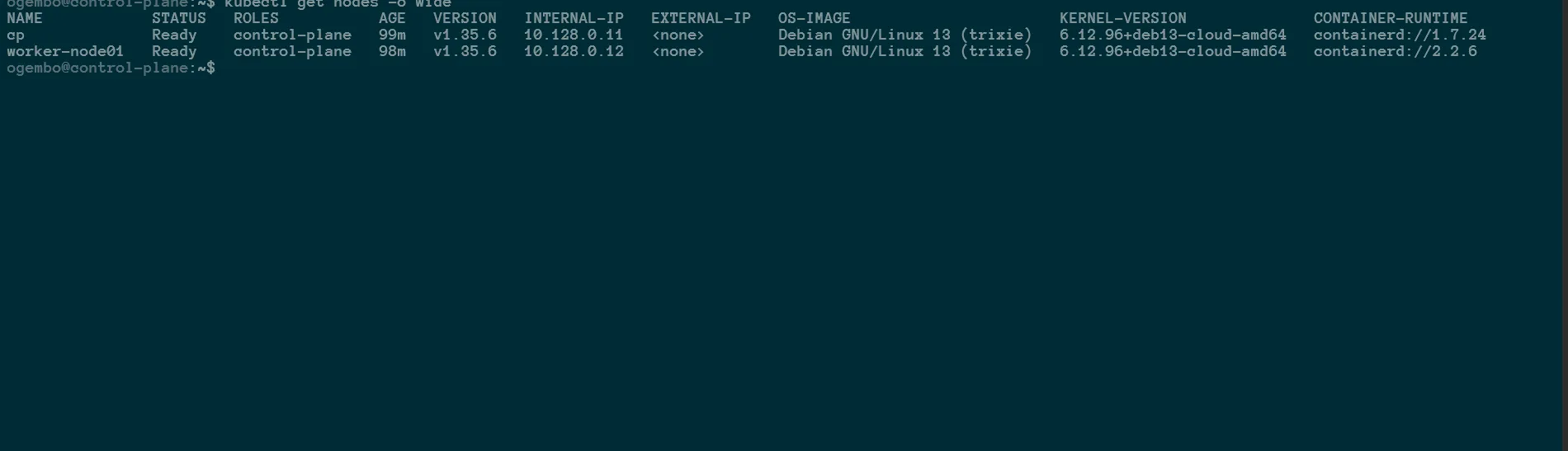
Cilium’s eBPF stack and CoreDNS were running cleanly in kube-system:

The test workloads received overlay IPs from Cilium:

Finally, I ran an ICMP ping from net-test-1 to net-test-2:

7 packets transmitted, 7 packets received, 0% packet lossThat final result is the part worth remembering. Troubleshooting Kubernetes is mostly about reading the evidence: check the current context, inspect scheduling events, follow the runtime errors, and trace the path between the component that is looking for something and the component that provides it.
That is how kubeadm init becomes a working cluster.